
This article is intended solely for cybersecurity professionals and security practitioners seeking to enhance their defensive capabilities and protect their networks more effectively. All information provided is for educational and defensive purposes only. Any attempt to misuse, implement, or apply the techniques discussed for unauthorized activities is strictly illegal and may result in severe legal consequences. The author assumes no responsibility for misuse of the content.
Summary
This started with a simple observation while reviewing Process Monitor boot logs: a legitimate Google updater process attempting to load dbghelp.dll following the standard Windows DLL search order.
From that small detail, the journey started to:
- Identifying a potential DLL side-loading execution path
- Building a working PoC to confirm code execution
- Stabilizing the PoC using a DLL proxy technique
- Turning execution into persistence
- And finally, exploring detection and forensic opportunities
How it started
I was spending a perfect weekend doing one of my favorite hobbies: randomly running Process Monitor boot logging.
In this mode, Procmon loads its driver during system startup, which allows it to capture activity very early in the boot process. Essentially, the Windows kernel loads Procmon’s driver (PROCMON24) at boot, and you get visibility into operations happening before you even log in.
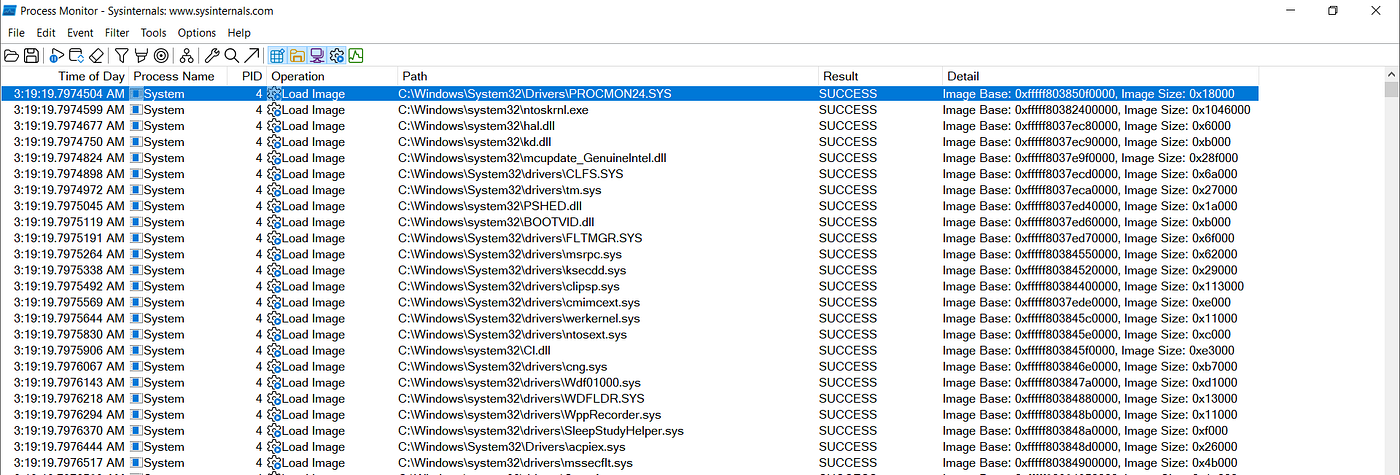
Windows Kernel loading Procmon’s driver “PROCMON24” at boot.
While digging through the pile of events, more than 4 million events in just a few minutes, something caught my eye. A process named updater.exe from this path:
C:\Program Files (x86)\Google\GoogleUpdater\143.0.7482.0\You can reasonably assume it belongs to Google. What really caught my attention was that the process updater.exe was trying to locate a DLL named dbghelp.dll.
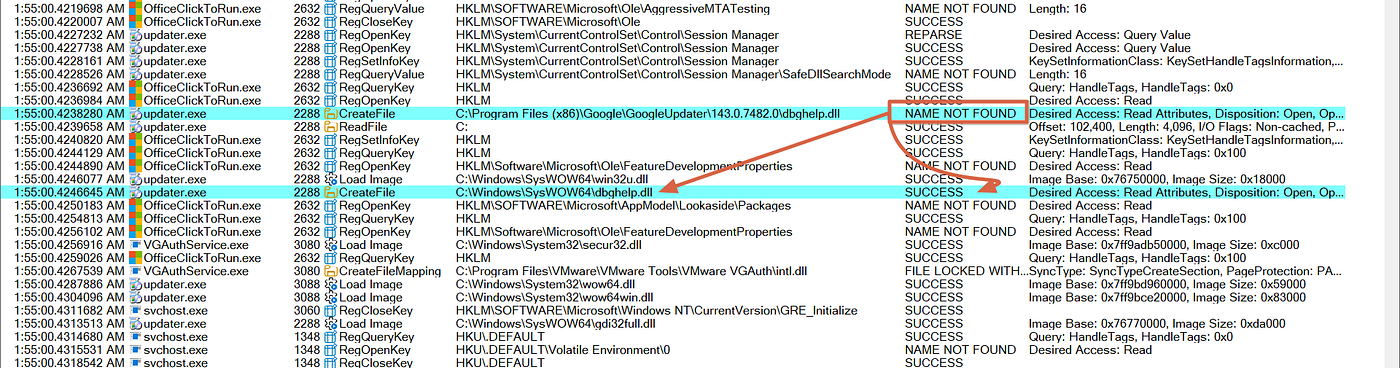
The process updater.exe was trying to locate a DLL named dbghelp.dll.
dbghelp.dll is a Microsoft Windows library used for debugging applications and handling crash analysis. In short, it’s commonly used for troubleshooting and diagnostics.
From the screenshot, you can see the following behavior:
- The process first attempts to load the DLL from its own directory:
C:\Program Files (x86)\Google\GoogleUpdater\143.0.7482.0\— this attempt fails with NAME NOT FOUND. - Immediately after, it falls back to the standard system location
C:\Windows\SysWOW64\, and the DLL is successfully loaded from there.
What’s going on here?
Before jumping to conclusions, let’s take a step back and understand what’s actually happening.
What is a DLL?
A DLL (Dynamic Link Library) is simply a shared library in Microsoft Windows. Instead of every program having its own copy of common functionality, Windows allows applications to reuse code from DLLs — such as kernel32.dll, user32.dll and dbghelp.dll. Programs import functions from these DLLs and use them at runtime.
DLL Search Order
When a program tries to load a DLL (like dbghelp.dll) without specifying a full path, Windows follows a search order. A simplified version:
- Application directory
- System directory (System32 / SysWOW64)
- Windows directory
So, in our case it first checked the application directory C:\Program Files (x86)\Google\GoogleUpdater\143.0.7482.0\ → NAME NOT FOUND, then C:\Windows\SysWOW64\ → SUCCESS.
Why this matters
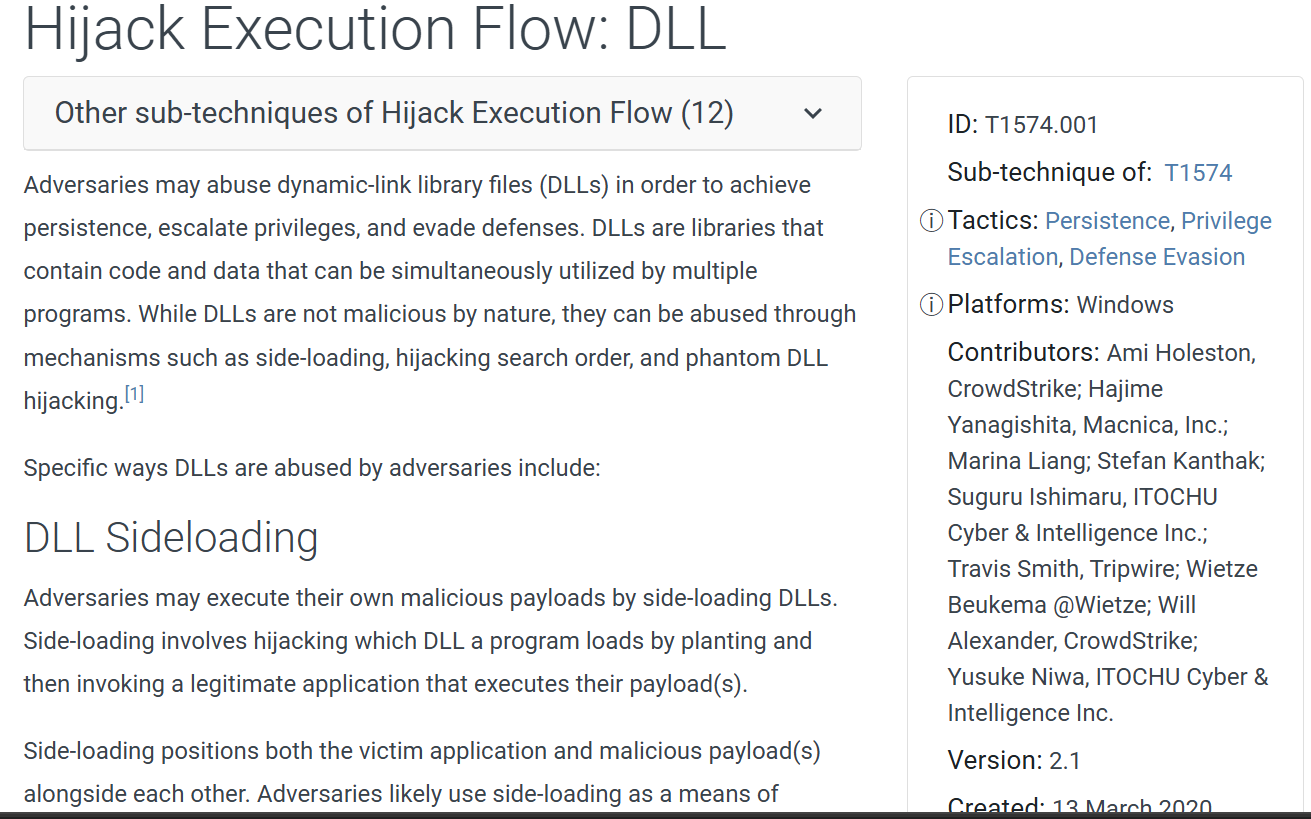
This behavior opens the door to a well-known technique: DLL Search Order Hijacking (DLL side-loading). Documented in MITRE ATT&CK as T1574.001 — Hijack Execution Flow: DLL.
A screenshot from the MITRE ATT&CK Enterprise Matrix.
What if an adversary hijacks this?
Let’s say an attacker manages to place a malicious DLL at C:\Program Files (x86)\Google\GoogleUpdater\...\dbghelp.dll. Now the flow becomes:
- Application
updater.exestarts - Windows loader checks the application directory first
- Finds the attacker-controlled DLL
- Loads it instead of the legitimate one
And this is exactly what I did next…
Behavioral Analysis: updater.exe
So now we have a process that belongs to Google Chrome, attempting to load a DLL following the Windows DLL search order. Theoretically: if I have the right privileges, I can drop a malicious DLL in that directory, and the Google process will execute my code on my behalf. That’s the hypothesis. Now let’s validate it.
Loading the Library
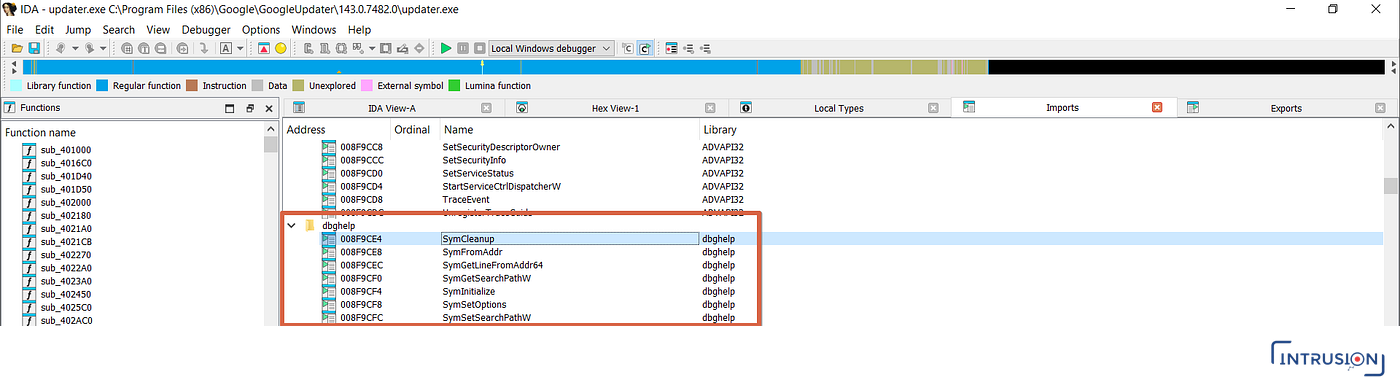
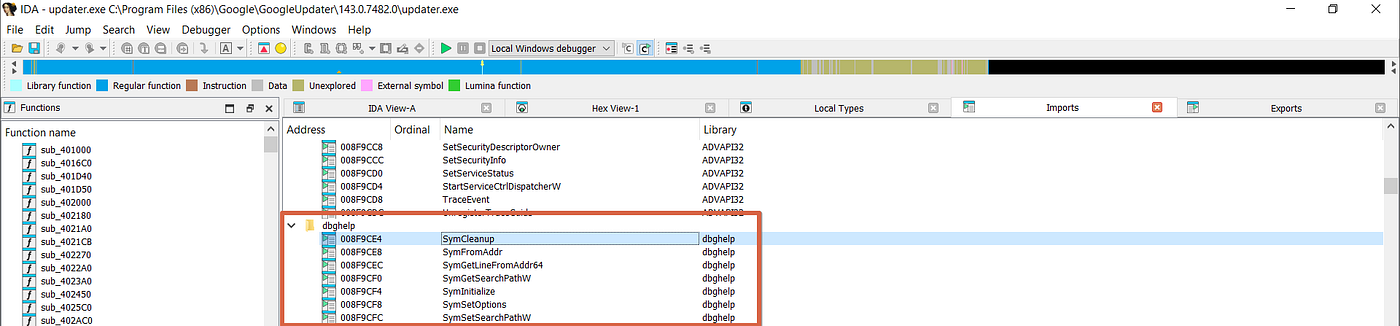
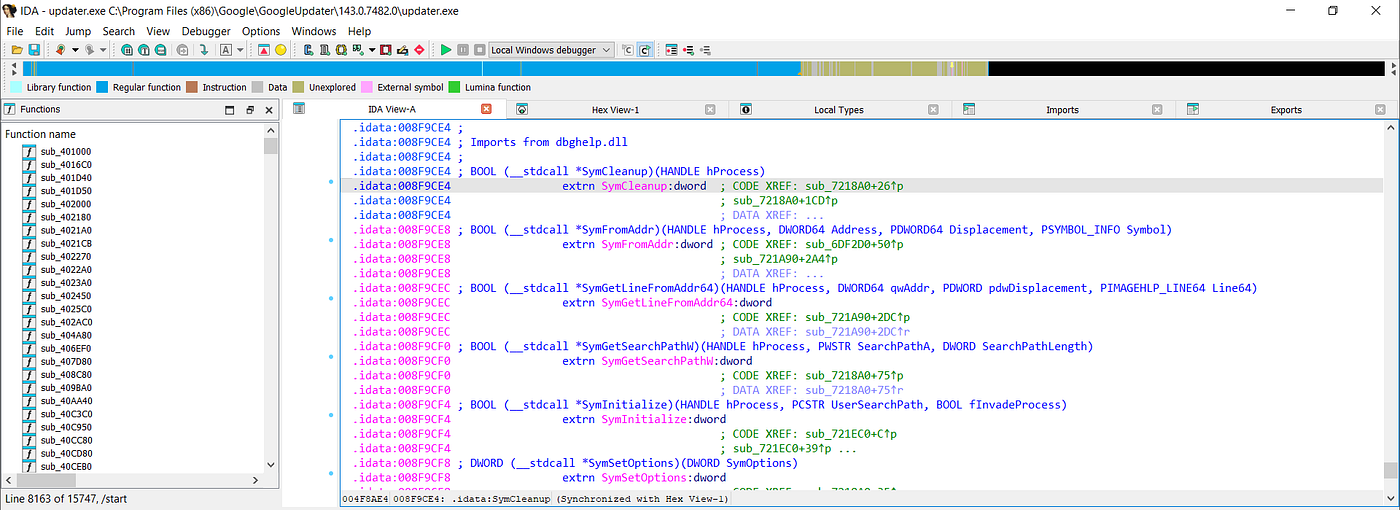
From the following screenshots (IDA Free), you can clearly see that updater.exe does load dbghelp.dll — and not just load it, it actually resolves and uses multiple functions from it.

But… how does updater.exe even run?
Before jumping into exploitation, I needed to understand the execution context. From the Procmon logs, I noticed that updater.exe is spawned by services.exe. This immediately indicates the binary is running as a Windows Service. To confirm that, I correlated multiple sources:
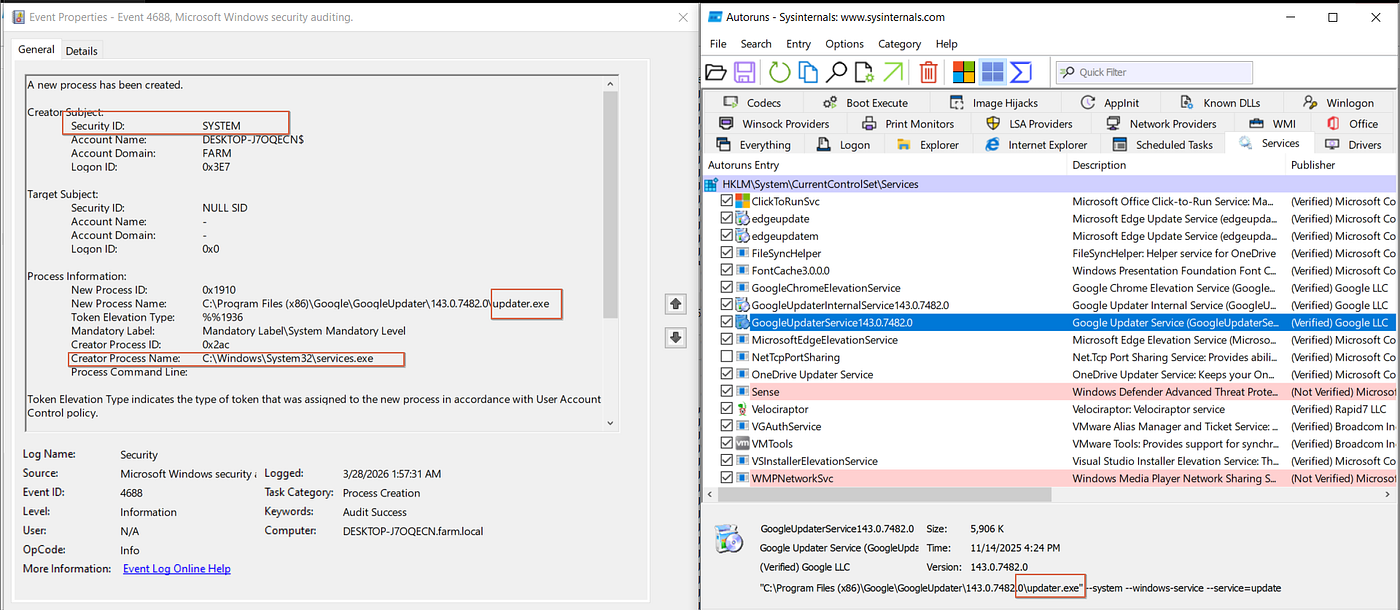
A Microsoft-Windows-Security-Auditing/4688 “A new process has been started” event shows services.exe as the parent process, and an Autoruns record shows updater.exe registered to run as a service.
Services often run under NT AUTHORITY\SYSTEM, which means higher privileges and execution at system startup.
Working PoC
My first PoC was simple: a basic DLL that, when loaded, creates a file under C:\Windows\Temp\. The goal here was not stealth, not persistence, just one thing: confirm code execution.
#include "pch.h"
#include <windows.h>
#include <fstream>

DWORD WINAPI WorkerThread(LPVOID lpParam) {
    const char* path = "C:\\Windows\\Temp\\dll_poc_success.txt";

    std::ofstream file(path);
    if (file.is_open()) {
        file << "[PoC] DLL executed via worker thread\n";
        file.close();
    }

    return 0;
}

BOOL APIENTRY DllMain(HMODULE hModule, DWORD ul_reason_for_call, LPVOID lpReserved) {
    if (ul_reason_for_call == DLL_PROCESS_ATTACH) {
        DisableThreadLibraryCalls(hModule);

        HANDLE hThread = CreateThread(NULL, 0, WorkerThread, NULL, 0, NULL);

        if (hThread)
            CloseHandle(hThread);
    }

    return TRUE;
}
I compiled the DLL and moved it to my testing VM. Then I created a new folder, placed a copy of updater.exe inside it, and dropped my dbghelp.dll next to it. At this stage I was only looking for one thing: does the binary load my DLL?
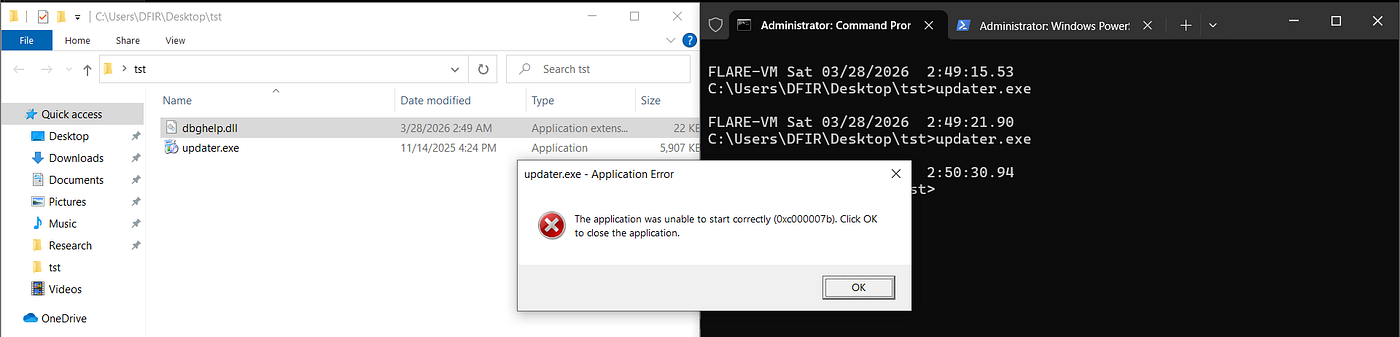
It crashed. And honestly… thank God. In this context, a crash often means you interfered with the normal execution flow, which strongly suggests my DLL was actually loaded and interacted with.
Why did updater.exe crash?
The error was 0xc000007b, which typically means STATUS_INVALID_IMAGE_FORMAT — an architecture mismatch (x86 vs x64) or an invalid / incompatible DLL structure. Since dbghelp.dll is statically imported, the loader expects certain exported functions to exist. So I added:
extern "C" __declspec(dllexport) BOOL SymCleanup(HANDLE hProcess)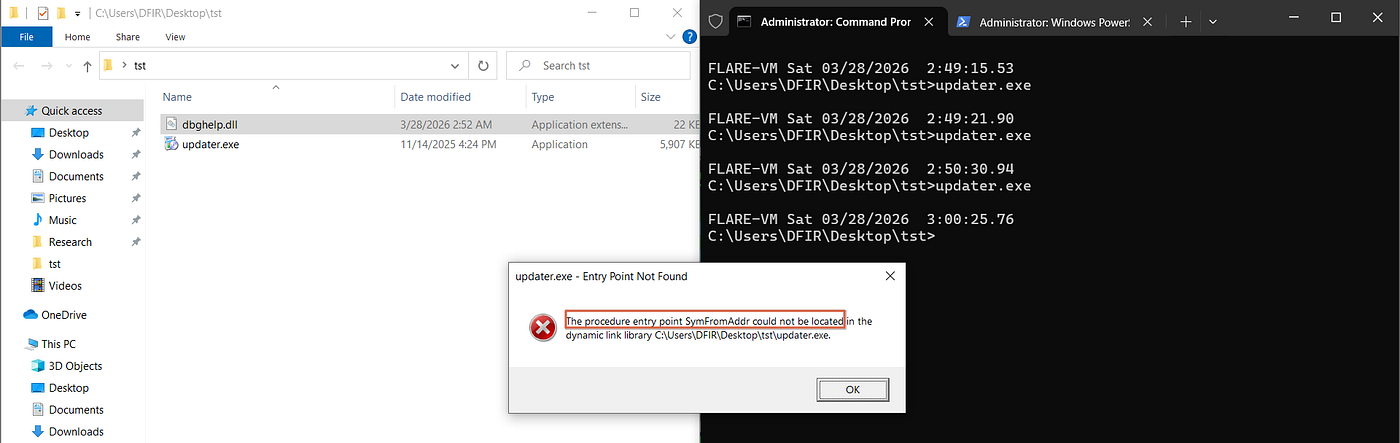
The procedure entry point SymFromAddr could not be located in the dynamic link library.
Now the loader successfully found one expected function (SymCleanup) but then failed to find other required exports like SymFromAddr. The application expects a full implementation of dbghelp.dll exports, not just one function. Right now the DLL is loaded, execution is happening, but the application is unstable — which means the entire technique is unreliable. For now.
Stable PoC
We need something better: a PoC that executes our code without breaking the application.
What is a DLL Proxy?
A DLL Proxy (or proxying DLL) is a fake DLL that implements the required exported functions, forwards calls to the real legitimate DLL, while also executing attacker-controlled code. So it acts like: Application → Our DLL (fake dbghelp.dll) → Real dbghelp.dll. The application keeps working normally and our code still executes.
Building the proxy
Instead of reinventing the wheel, I used Spartacus, which automates the proxy creation. I’ll skip the setup details; the GitHub page explains it clearly.
Final test
After replacing the crashing DLL with the proxy version, I ran updater.exe again: no crash this time, and the service behaved normally.
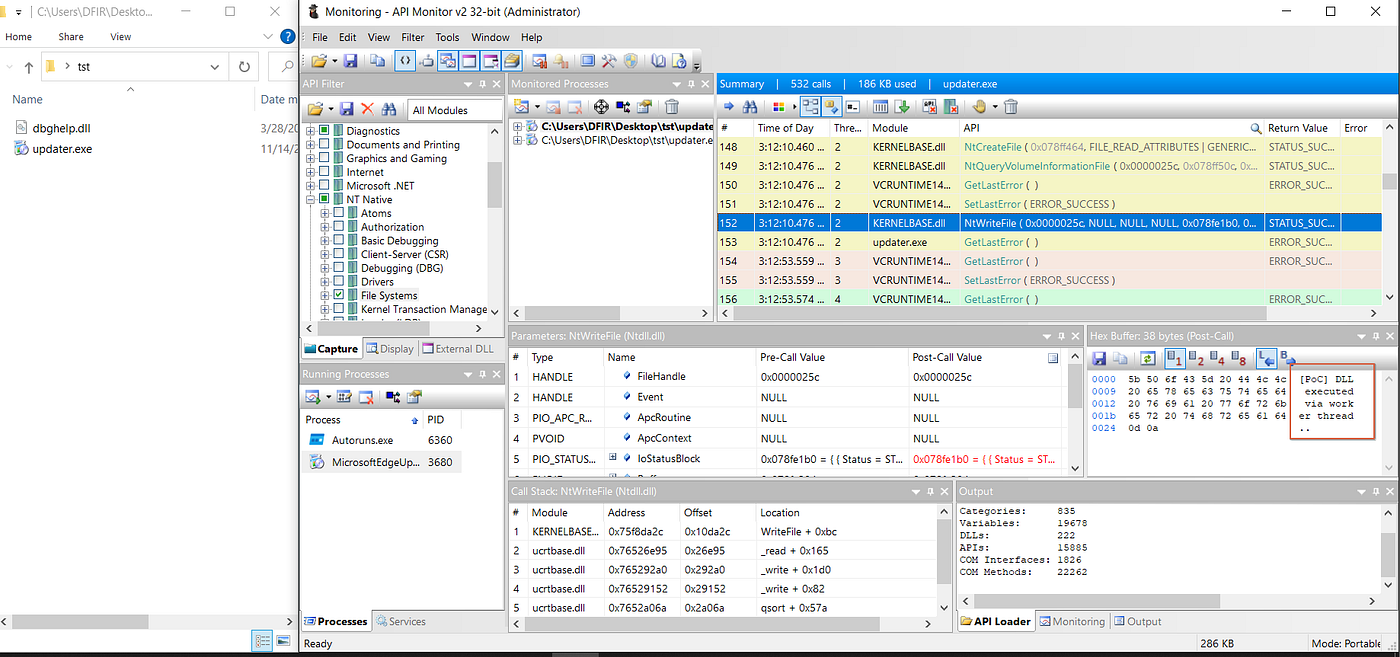
API Monitor v2 tracing the API calls, including the NtWriteFile call creating our PoC file in the Temp.
And more importantly, the file was successfully created in C:\Windows\Temp\.
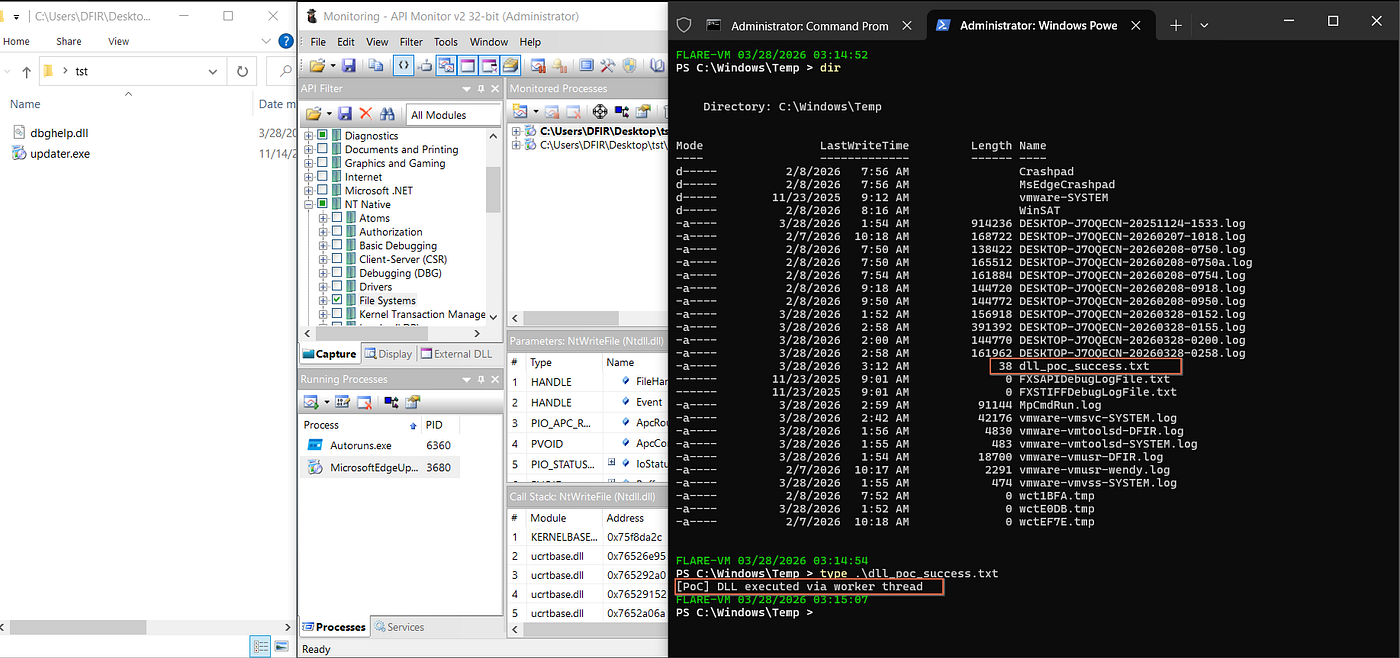
From a blue team perspective, I honestly lost count of how many incidents used this exact technique (DLL side-loading): drop legitimate software plus a malicious DLL (with extra obfuscation to bypass AV scanning) and execute silently. This technique is still effective, common, and hard to detect in some environments — many, actually.
Persistence
The idea is simple. updater.exe runs at Windows startup, and as we already saw, it looks for dbghelp.dll starting from its own directory. So if we place our fake dbghelp.dll inside the updater’s directory C:\Program Files (x86)\Google\GoogleUpdater\143.0.7482.0\, it will be loaded every time the system boots, under the NT AUTHORITY\SYSTEM context.
To validate this, I enabled Process Monitor boot logging again, moved the proxy dbghelp.dll into the updater.exe directory, and rebooted the testing VM.
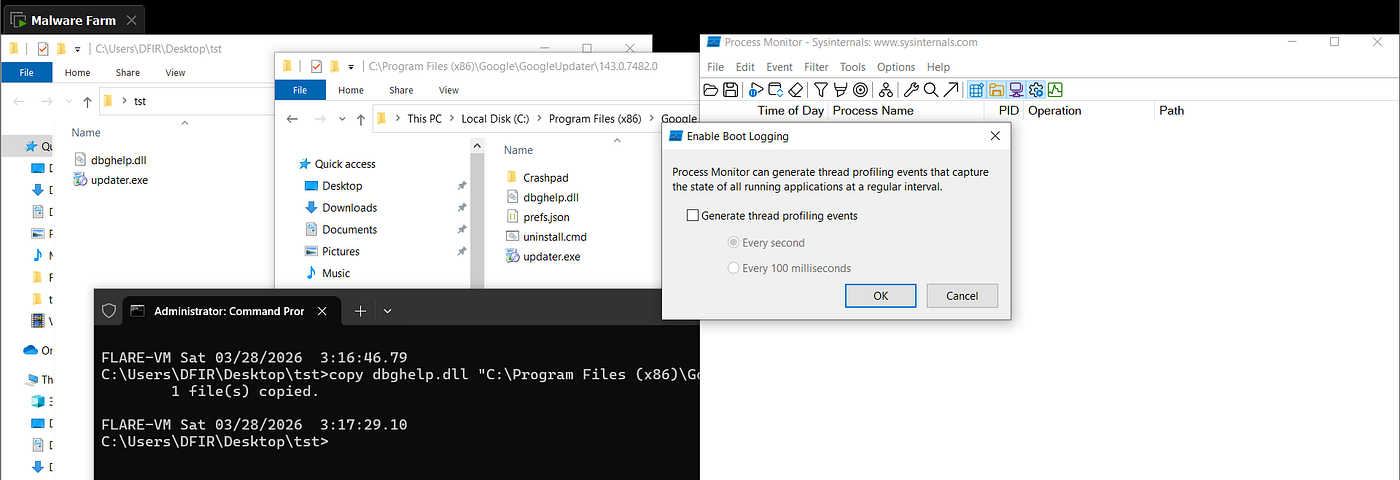
Moving the fake dbghelp.dll to the updater.exe folder and enabling ProcMon boot logging.
The result?
Right after boot, the PoC file was created again under C:\Windows\Temp\ — and this time it happened during system startup, without any manual interaction.
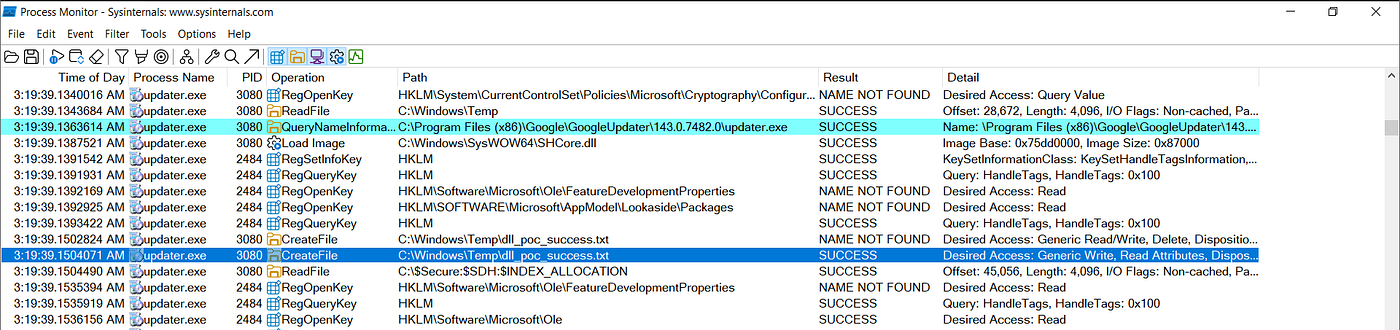
Extra confirmation
- Sysmon Event ID 11 (File Create) confirmed the file creation
- The file itself was present on disk
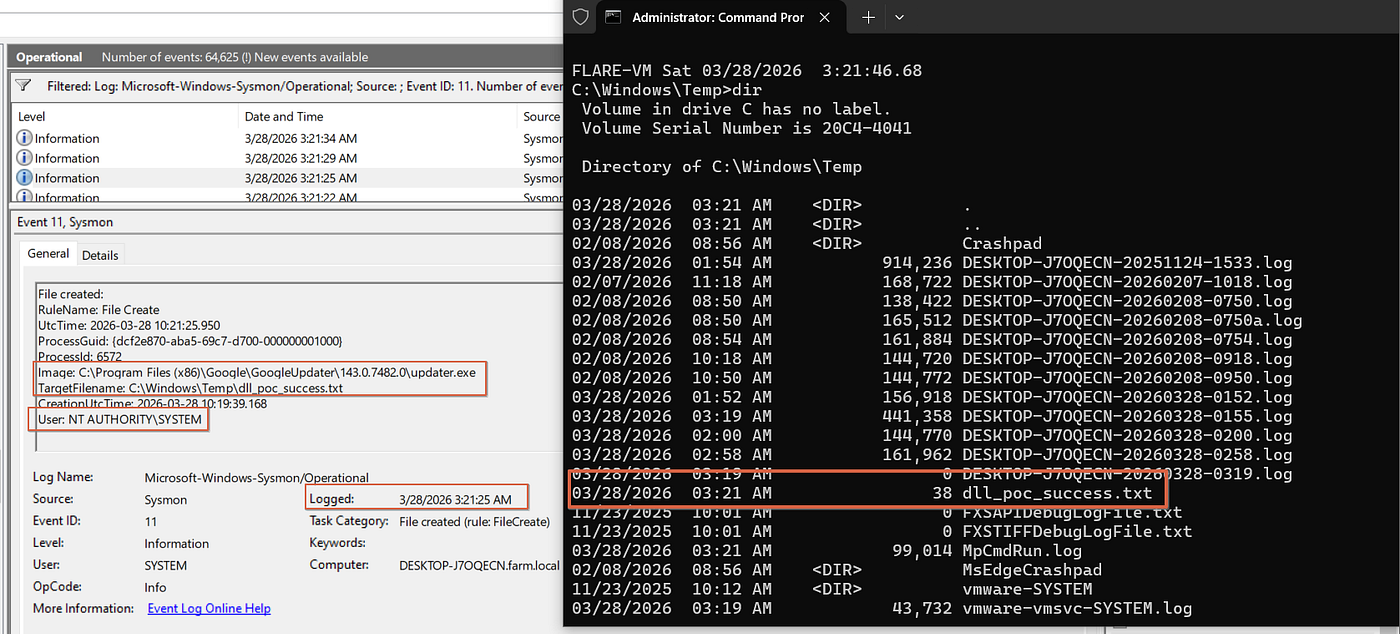
At this point it becomes very clear: as long as the fake dbghelp.dll stays next to updater.exe, it will be loaded and executed on every system boot. Did I mention that we call this persistence?
Procedure Caveats
As I mentioned earlier, DLL side-loading is a very effective technique. However, using Google Chrome’s updater.exe specifically comes with some limitations.
1. Persistence limitation
If your goal is persistence, then this directory (C:\Program Files (x86)\) is only writable by administrators. Which means if you already have admin privileges there may be easier and more reliable persistence techniques available.
2. Execution / Evasion use case
However, if the goal is less noisy execution, blending with legitimate binaries, or evasion of certain detections, then this limitation doesn’t really apply. You can simply drop updater.exe and the malicious dbghelp.dll into any writable location (%TEMP% or the user profile directory) and execute updater.exe. The same DLL side-loading behavior will happen. And this is not theoretical — I’ve seen this exact pattern used as an initial execution stage in multiple ransomware intrusions.
At-Scale Detection Opportunities
Now switching hats to blue team. Detecting this kind of behavior from a SOC perspective depends — like everything else — on the detection capabilities in place; visibility, coverage and telemetry; and detection maturity.
1. Static scanning layer
The first line of defense is usually AV scanning, either host-based or network-integrated. But realistically, a fresh payload with decent obfuscation can bypass this layer without much effort.
2. File creation telemetry
This is where things get more interesting. With proper logging in place, you can detect patterns like:
- An
.exeand.dlldropped in the same directory within a short time window - New DLLs appearing next to legitimate executables or in non-standard locations
- Suspicious DLL names matching known system libraries (
dbghelp.dll,version.dll, etc.)
This is a strong signal for side-loading preparation.
3. DLL load telemetry
Monitoring DLL loads is even more powerful. Look for processes loading DLLs from non-standard locations (user-writable directories and temporary folders), and the loading of unsigned DLLs.
4. Baseline is everything
None of this works well without baselining. You need to understand what “normal” looks like, because a deviation from baseline is often the detection itself.
5. Proactive hunting
And finally, don’t wait for alerts. Hunt for this technique proactively: search for known side-loading patterns, investigate suspicious DLL placements, and focus especially on areas where your visibility is weak.
Forensics Perspective (my favorite part)
For the forensics part, I think a trained eye can recognize this behavior without much effort — of course, only if you know what you’re looking for in the first place, and how to look for it.
Timeline analysis
I ingested multiple processed forensics artifacts, collected from the testing VM, into Timesketch.
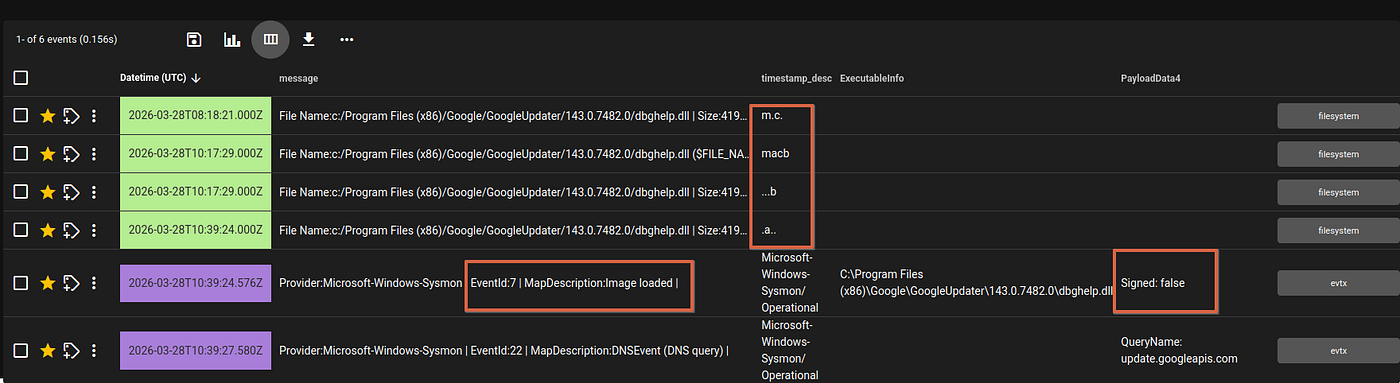
Forensics timeline ingested into Timesketch.
In the timeline, built from multiple data sources — the $MFT (Windows file system metadata) and Sysmon logs — even at a quick glance it becomes trivial to spot an unsigned DLL being introduced and then loaded by a legitimate process.
What stands out?
From a timeline perspective: the DLL appears suddenly in the directory, shortly after it gets loaded by updater.exe (or after the boot), followed by file creation activity (our PoC).

This sequence is a strong behavioral indicator of DLL side-loading. And let’s be realistic — in many environments where you’ll be called as a DFIR analyst, Sysmon is simply not there. But even then, you’re not blind. An isolated $MFT timeline alone is often enough. Even without advanced telemetry, you can still detect the DLL being created or copied into the directory, its timestamps (Created / Modified), and — most importantly — those timestamps probably won’t align with the surrounding files. For example: the original application files were installed months ago, while the malicious DLL was dropped just minutes before execution. That inconsistency is a huge red flag.
Conclusion
I started it as a weekend experiment, just going through boot logs and following a small observation, so I don’t really have anything formal to conclude. Just a big thank you to my wife for her unconditional and continuous support.
This article was originally published by the author on Medium: Weaponizing Google Chrome Update Service for Execution & Persistence.
0 comments
No comments yet. Be the first to share your thoughts.